Database Internals
What is a Database?
A database is a collection of data stored electronically so that it can be accessed, retrieved, managed, and updated efficiently.
But wait! What about MongoDB, where data is stored as documents and different records can have different structures? Doesn’t that contradict our definition of a database as an organized collection of data?
Not really!
The word “organized” doesn’t mean the data must live in tables with predefined rows and columns. Different systems organize and store data in different ways.
The software that does this organizing is called a Database Management System (DBMS). MySQL, MongoDB, and Redis are all DBMSs. For example:
If your application has complex relationships between entities, such as users, orders, and products, you might choose a relational DBMS like MySQL. If your application needs a flexible schema where documents can have different fields, you might choose a document DBMS like MongoDB.
Consider the below picture for reference I added an another row with different field and it saved while the same one would give an error in a relational database


If you need to store frequently accessed, short-lived data such as sessions and cache entries, you might choose an in-memory DBMS like Redis this will be covered in a separate article.
In short, a database is the organized data itself, and a DBMS is the software that stores, retrieves, and manages it. Different DBMSs just do this in different ways. But that’s a story for another day, because today we’re focusing on how a DBMS works internally. We’ll explain only mysql and follow a query from the moment you enter it to the moment it reaches the storage engine.
Ready for this?
Do keep in mind that I’ll assume you already know the basics of the queries you enter in a database client.
And sorry for the little refresher above! I thought it would be unfair to throw technical jargon in your face right away.
Okay, so we know what a database is, and we know the DBMS is the software managing it. But what actually happens when you hit “Run” on a SQL query?
Let’s trace the life of a simple query: SELECT name FROM employees WHERE emp_no=10001.
Look at the diagram below. It’s a vertical pipeline. On the left, we have the “What Happens” (the internal machinery), and on the right, we have “What you enter” or what the system produces at that exact moment.
Here is the step-by-step breakdown of how your database processes that text.
1. The Client & The Text
It all starts here. You type your SQL query into your client (like MySQL Workbench, DBeaver, or a terminal). At this stage, it is literally just plain text. The database has absolutely no idea what SELECT or users means yet. It’s just a string of characters being sent over a network.
2. The Transport Layer (Connection Handler)
Before the database even looks at your text, it needs to know who you are. The Connection Handler steps in. It checks your credentials (username/password), verifies which database you are trying to access, and assigns you a specific thread to handle your request. Think of this as the bouncer at a club checking your ID before you even get to the dance floor.
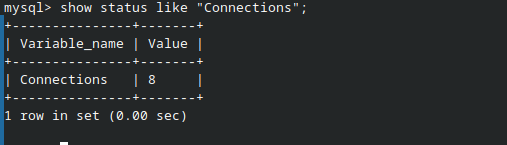
This is the connection handling done my the dbms itself:

It verifies the user and hosts maintains the sessions on server side for the duration of client requests.
3. The Parser (The Grammar Checker)
Now we enter the Query Processor. The first stop is the Parser.
Remember the purple box on the left? That’s the “Parsing of each word” breakdown. The parser takes your raw text and checks it against the SQL grammar.
- Is
SELECTa valid keyword? Yes. - Is
FROMin the right place? Yes. - Does the syntax make sense?

If you made a typo, this is where it dies and throws an error. If it passes, the Parser spits out a Parse Tree. It breaks your query down into labeled pieces (words) so the system can understand the structure.
4. The Optimizer (The Route Planner)
This is arguably the smartest part of the database. The Optimizer takes the Parse Tree and asks: “What is the absolute fastest way to get this data?”
Let’s say you have a million users. Should the database read every single row until it finds id=5? Absolutely not. The Optimizer looks at the available indexes and statistics. It realizes, "Hey, id is a Primary Key! I can do a direct lookup instead of scanning the whole table."
It then creates an Execution Plan. In our diagram, the plan is simply: “Primary key lookup, 1 row.” It found the fastest route.
Lets look at an example so it is cleared:
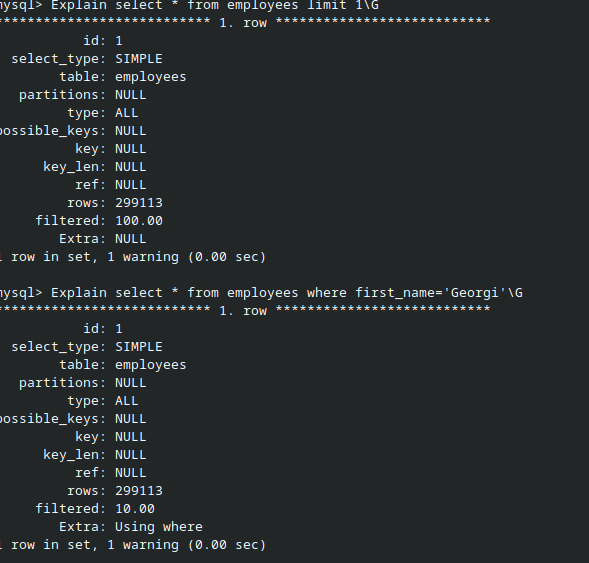
If you look at both theseEXPLAIN output, we asked the database to find an employee by their first_name.
Notice the type column. It says ALL. This is the optimizer’s way of saying, "I have no shortcuts here, so I'm going to read the entire table from top to bottom."
Look at the rows column next: 299,113. The database is estimating it will have to look at nearly 300,000 records just to find one person. This is exactly what happens when you don't have an index on a column. In our diagram, the optimizer would have looked at this and created an execution plan for a "Full Table Scan." It's slow, it's heavy on the disk, and it's exactly why adding indexes is so important.
But what if we refer the employee number which is the primary key

P.S Since you may or may not know about indexes they are pointers to our data. An index maps to a page which has our data in it. In the case of not creating an index a primary key also by default in innodb creates a clustered index(will be covered later).
5. The Executor (The Worker)
The Executor is the muscle. It takes the Execution Plan from the Optimizer and actually does the work. It doesn’t care about grammar or optimization; it just follows the recipe.
It calls the Handler API with specific instructions: “Go to the storage engine, read the row where key equals 5, and give me the data.”
This will be cleared with the following example:
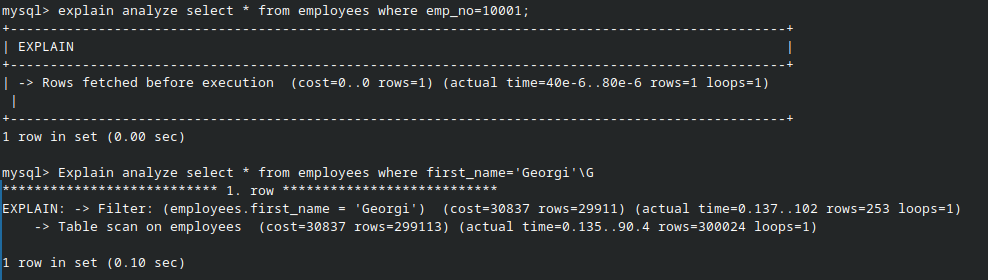
As mentioned before see since a table with primary key already gets it index created when we used that index to find a row the executor didn't have to load all the table. But when we referenced the record using non-primary key (in short no index) then it had to load the table. This is where query optimization comes.
6. The Storage Engine (InnoDB)
Finally, we hit the bottom layer: the Storage Engine. In this example, we are using InnoDB (the default for MySQL).
The Storage Engine is the component that actually touches the hard drive. It handles the heavy lifting:
- B-Tree: Navigating the index structure to find the key.
- Buffer Pool: Checking if the data is already in memory before going to the disk.
- Redo Log: Ensuring the data is safe if the power goes out.(Every write and change is added to this log(redo log) a tracker of sorts)
Once InnoDB finds the row, it sends the data all the way back up the pipeline to the Client, and voila — you see your user’s name on the screen.
And that’s the journey of a single query. From a plain string of text to a parsed tree, through the brain of the optimizer, and finally out to the disk. It’s a lot of work for a few milliseconds of waiting, but understanding this pipeline is the first step to writing better, faster queries. Now go run an EXPLAIN and see what your database is really thinking.
Comments
Join the discussionNo comments yet. Be the first to comment.