Database Optimization
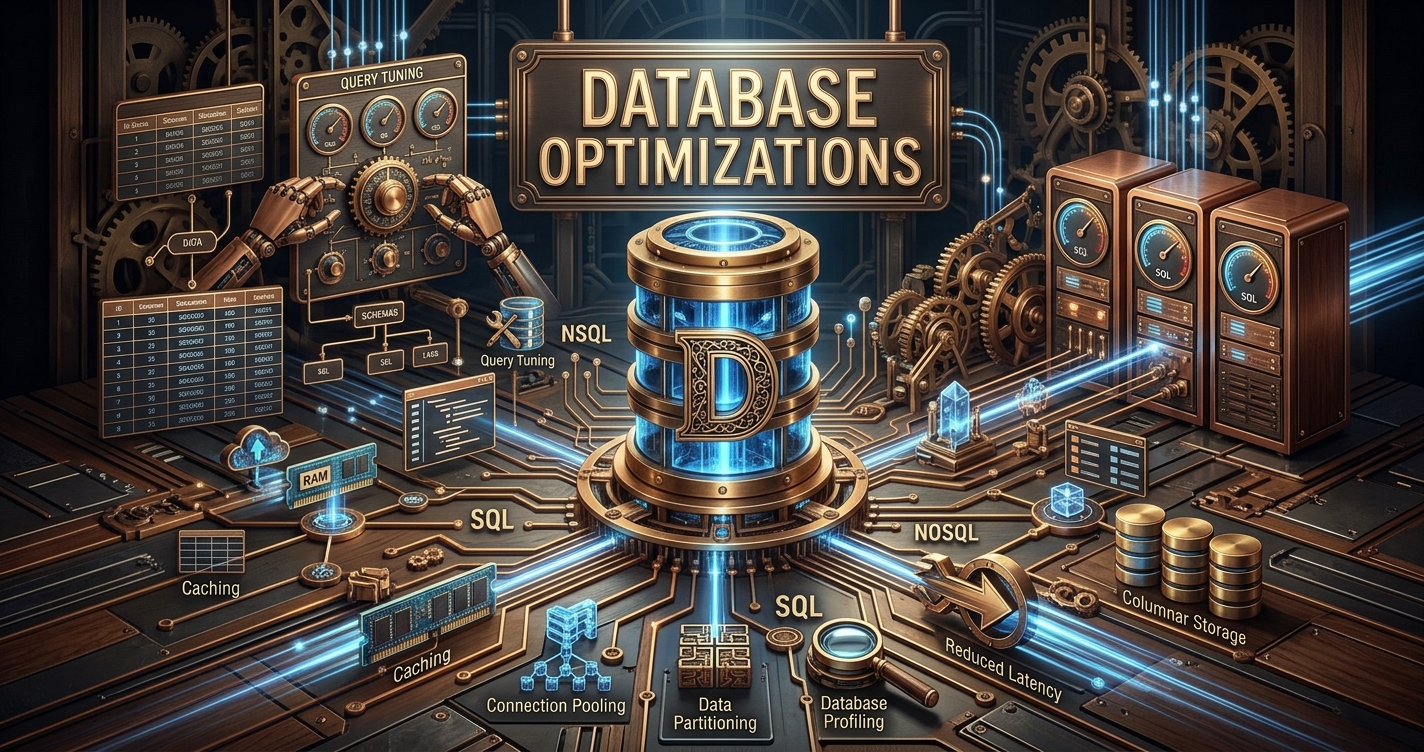
In this section we will be discussing various strategies for optimizing databases and what happens if we ignore them.
Database optimization is a two-way street. You can write the cleanest application code in the world, or tune your database configuration to perfection, but if you ignore one side of the equation, your app will still crawl.
Splitting Data: Horizontal vs. Vertical
When a single database server starts groaning—queries take seconds instead of milliseconds, disks fill up, and connections max out—adding another index won't save you. Think of a giant spreadsheet: there are two ways to tear it apart.
Horizontal Partitioning (Splitting by Rows): You keep the exact same columns, but divide the rows across smaller tables. You can split by Range (e.g., dates or sequential IDs), List (e.g., specific regions or states), or Hash (running an ID through a mathematical function to distribute rows evenly).

Vertical Partitioning (Splitting by Columns): You separate heavy columns from frequently accessed ones. Instead of loading a 5MB profile picture every time you check a user's email address, you store the lightweight metadata in one table and isolate the heavy blobs in another.
1. Partitioning vs. Sharding: Where the Pieces Live
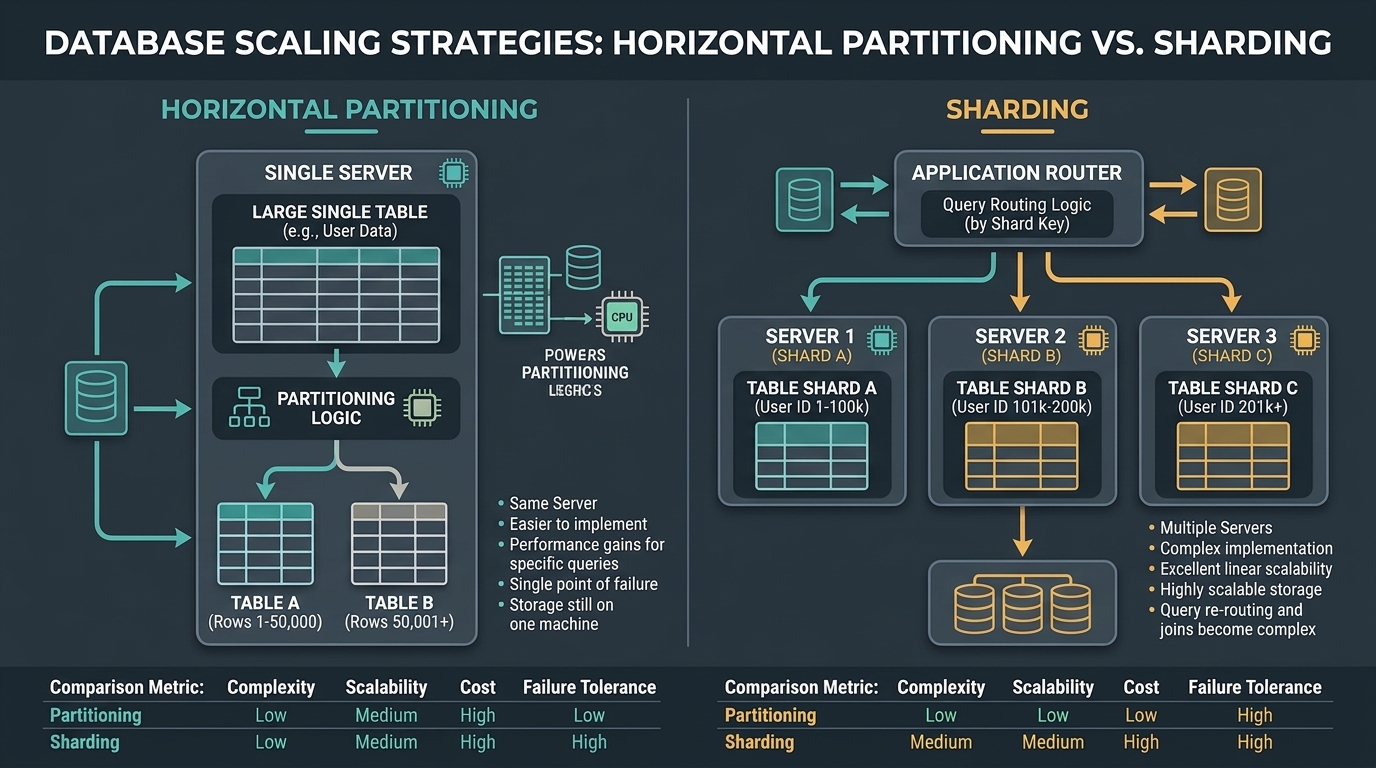
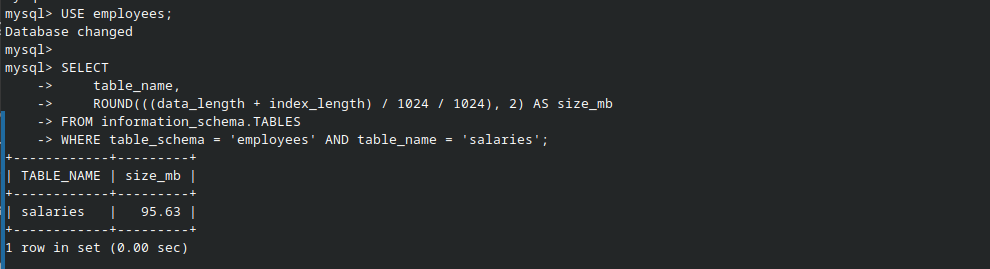
Both techniques split large tables into smaller pieces, but they differ completely in infrastructure and complexity we will follow along with hands on so you better understand the concepts. The following is a table on my database with sample dataset which we will practice on:
Partitioning (Same Server, Invisible to the App): Your table is split into smaller physical sub-tables on the exact same machine. Your application still queries one logical table name, and the database engine automatically routes the request to the right underlying partition.

Sharding (Different Servers, App-Aware): Your data is split across completely separate physical servers. Now your application has to become smart—it needs routing logic to know which server holds which user.
Why Indexes Still Matter on Partitioned Tables
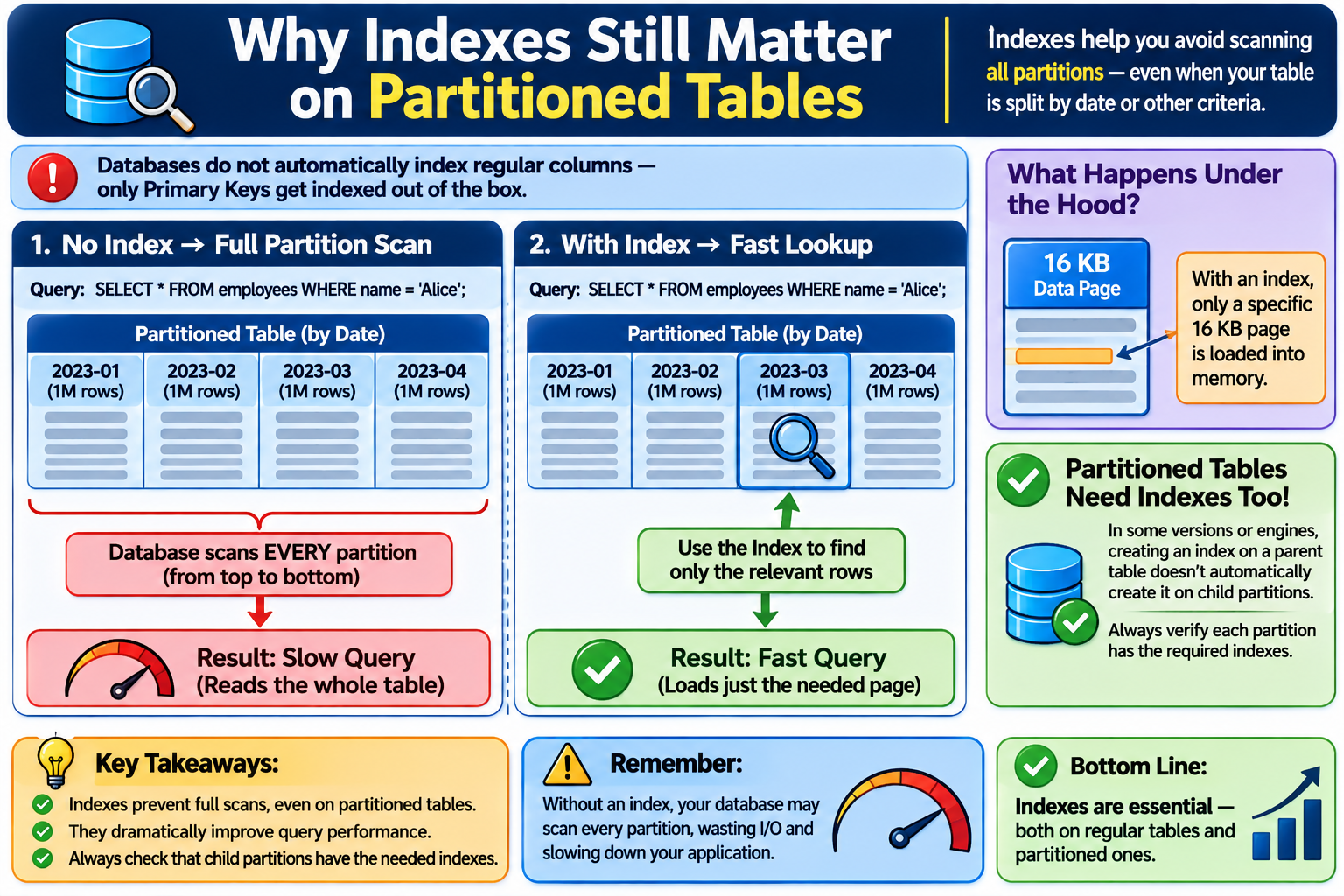
Databases do not automatically index regular columns—only Primary Keys get indexed out of the box. If you partition a table by date, and then query by a user's name without an index on that column, the database has to scan every single partition from top to bottom. Furthermore, in older database versions or certain engines, creating an index on a parent table doesn't always propagate to child partitions automatically—always verify that every child partition carries the indexes your queries rely on.
Lets look at what happens if we perform a query on the prepartitioned salary table:
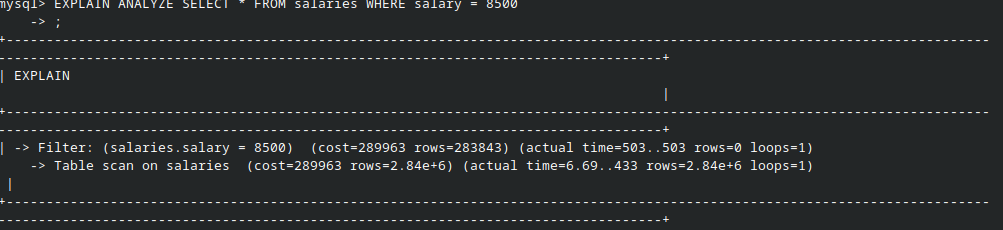
As expected you can see from screenshot it loaded the whole table or in DBA words it scanned the whole table aka loaded it into memory for reading.
Lets create an index on this table:

Look what happens if we run the same query again:

This time it didnt load the whole table instead it just had to load a specific page containing our row into memory since data is stored in fixed sized pages which are of 16kb size and fetch our rows. Since a index is a separate file that tracks our rows for the column on which index is present.
Pros and Cons of Partitioning
Why it shines:
Partition Pruning: Querying a specific month allows the database to skip every other partition completely.

Sequential Disk Reads: Because data from the same period is stored together physically, disk reads stay smooth and sequential instead of jumping randomly across years of records.

Instant Archiving & Bulk Loads: You can load millions of rows into a standalone staging table, build its indexes offline, and snap it into the live table in milliseconds—or drop an entire year's partition instantly without locking rows.
Where it hurts:
Moving Rows Across Partitions: Updating a record's partition key forces the database to delete it from one partition and insert it into another. Doing this in bulk can lock up your database.

Scatter Scans: Querying by a column other than the partition key forces the engine to search every partition, which is often slower than searching one unpartitioned table.
2. Deadlocks and Two-Phase Locking (2PL)
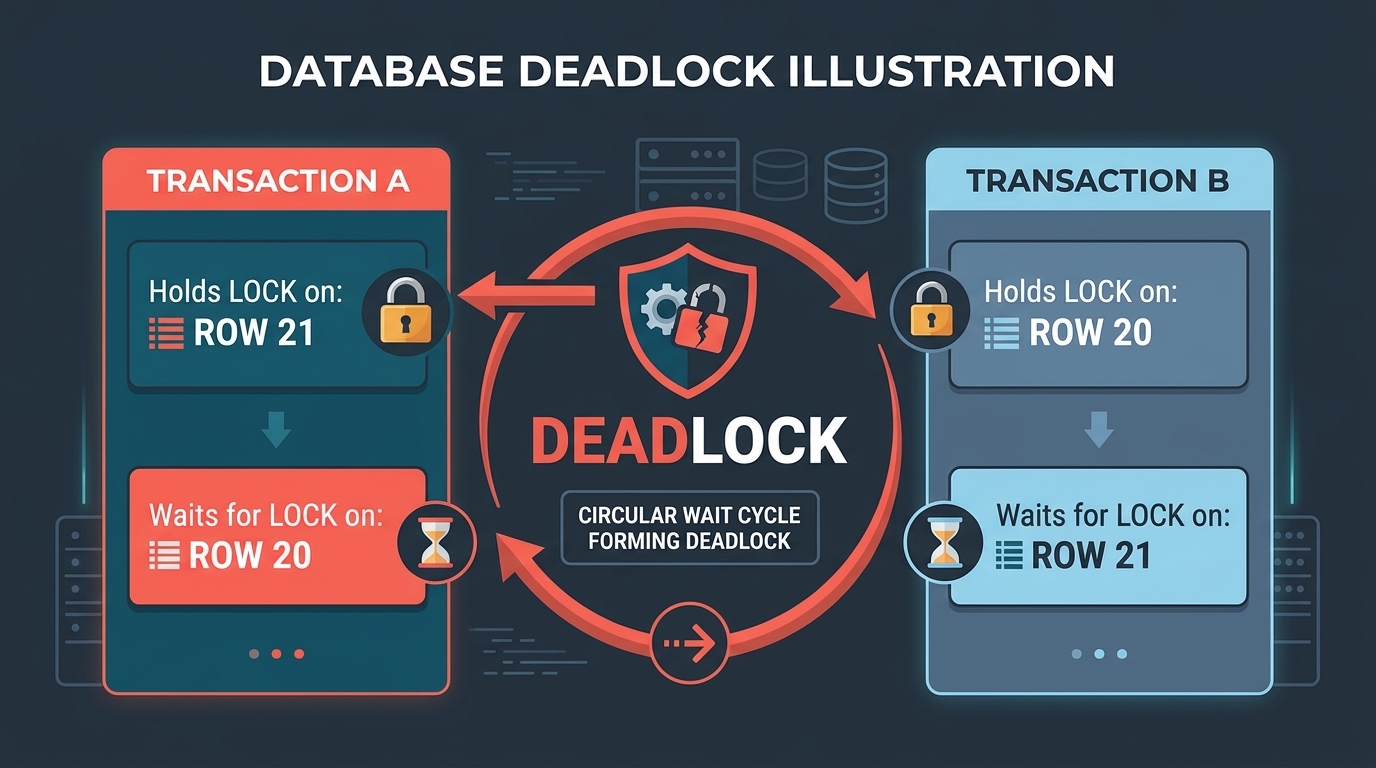
Deadlocks happen when two transactions lock resources in opposite orders and wait forever for each other to let go. For example, Transaction A inserts item 21 and tries to insert item 20, while Transaction B inserts item 20 and tries to insert item 21. Even though neither has committed yet, both hold internal transaction locks to verify unique constraints—creating a circular wait until the database kills one of them.
How to prevent it: Always acquire locks and modify records in a consistent, deterministic order across your application.
This behavior stems from Strict Two-Phase Locking (2PL), the mechanism databases use to guarantee transaction isolation. Under Strict 2PL, a transaction enters a Growing Phase where it acquires all necessary locks, and it is forbidden from releasing any of them until the entire transaction commits or rolls back. Without this rule, another user could read half-finished changes before a crash triggers a rollback.
Lets see it in action:
We will use two separate terminal windows connected to the database server to run overlapping transactions.
In Terminal 1, we start a transaction and update a row:

In Terminal 2, we start our own transaction and update a different row:

Now, let’s see what happens if Terminal 2 tries to update the same row that Terminal 1 already touched (dept_no = 'd002'):

Uh-oh. The query hangs, and eventually fails with this error:
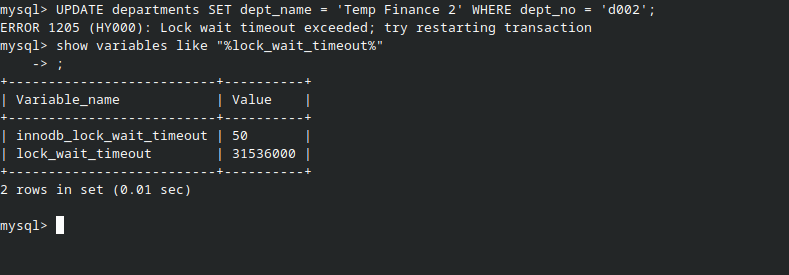
Why did this happen? Because Terminal 1 already grabbed an Exclusive Lock on that row and hasn't committed or rolled back yet. Terminal 2 is forced to wait in line. Once it waits longer than the innodb_lock_wait_timeout limit (50 seconds by default), MySQL gives up and bails out.
Look at what happens when we complete the cross-over: Terminal 1 is waiting on Terminal 2's row, and now Terminal 2 tries to grab Terminal 1's row (
d001).MySQL instantly detects the circular wait and kills the query with:

The database doesn't let both transactions hang forever. It sacrifices one of them—rolling it back automatically—so the other one can finish its work.
3. The OFFSET Pagination Trap
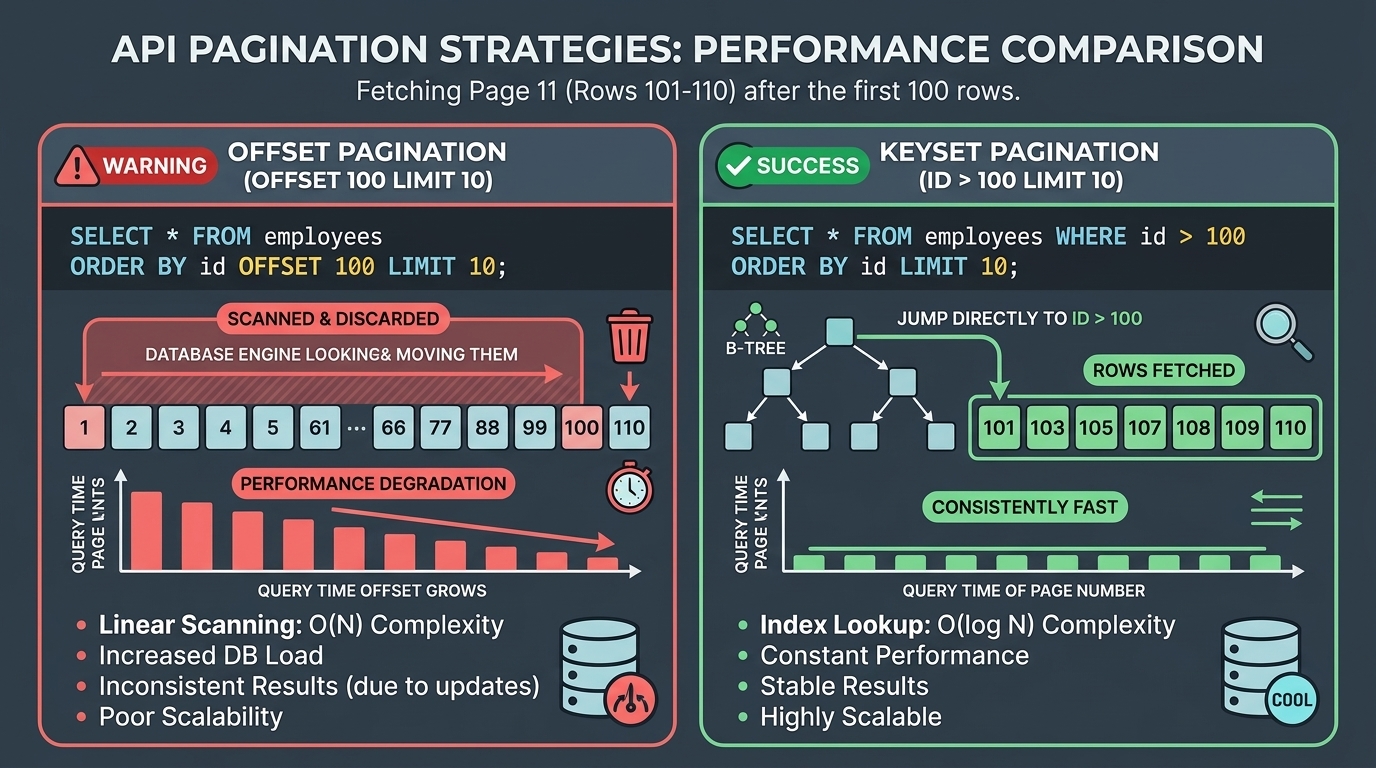
Traditional pagination asks the database to skip a set number of rows before returning the next page. Asking for page 10 is harmless. Asking for page 50,000 forces the database to read half a million rows from disk, load them into memory, throw all of them in the trash, and hand you the final ten. As your dataset grows, deep pagination spikes CPU usage to 100%.
The fix is Keyset (Cursor) Pagination: Instead of telling the database how many rows to skip, tell it the ID or timestamp of the last item the user saw. Using a B-Tree index, the database jumps straight to that exact spot and reads the next ten rows—zero wasted work.
Let’s see it in action, shall we?

So our 100,001st row has this employee number (20541).
Let's check what this cost us:
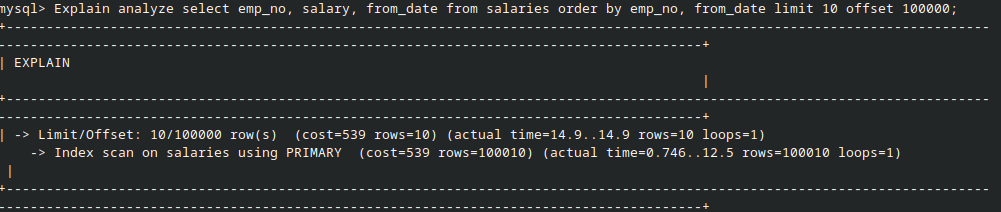
- It loaded 100,000 rows just to discard them and give us the next 10.
The Real-World Impact
Let’s assume you have a blog or social media website with posts.
If we used offset pagination here, we would load all your post records every time a user navigated to the next page. Now consider you have 10 users visiting your blog, each browsing through 100,000 posts. Got the idea? It causes unnecessary strain on the database.
Now, what if your application instead said: "Let's check what the last post I loaded on the previous page was (ID 20541). Let's load the next 10 straight from that row onto this page"?
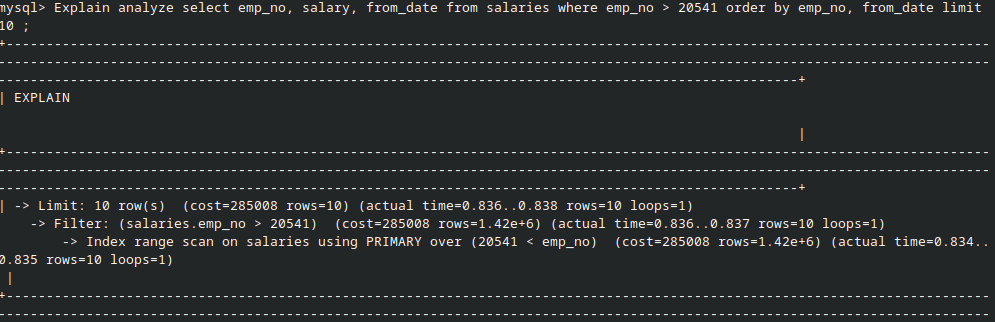
What Happened Here:
- Index range scan (The bottom line): Look at the text carefully:
over (20541 < emp_no). MySQL used the B-Tree index like a phonebook. It jumped directly toemp_no = 20541and started reading from there. It only read 10 rows (rows=10) and took 0.834 milliseconds. - Limit (The top line): It grabbed the 10 rows and stopped.
- Total Time: 0.838 milliseconds.
4. Connection Pooling: The VIP Club Gatekeeper
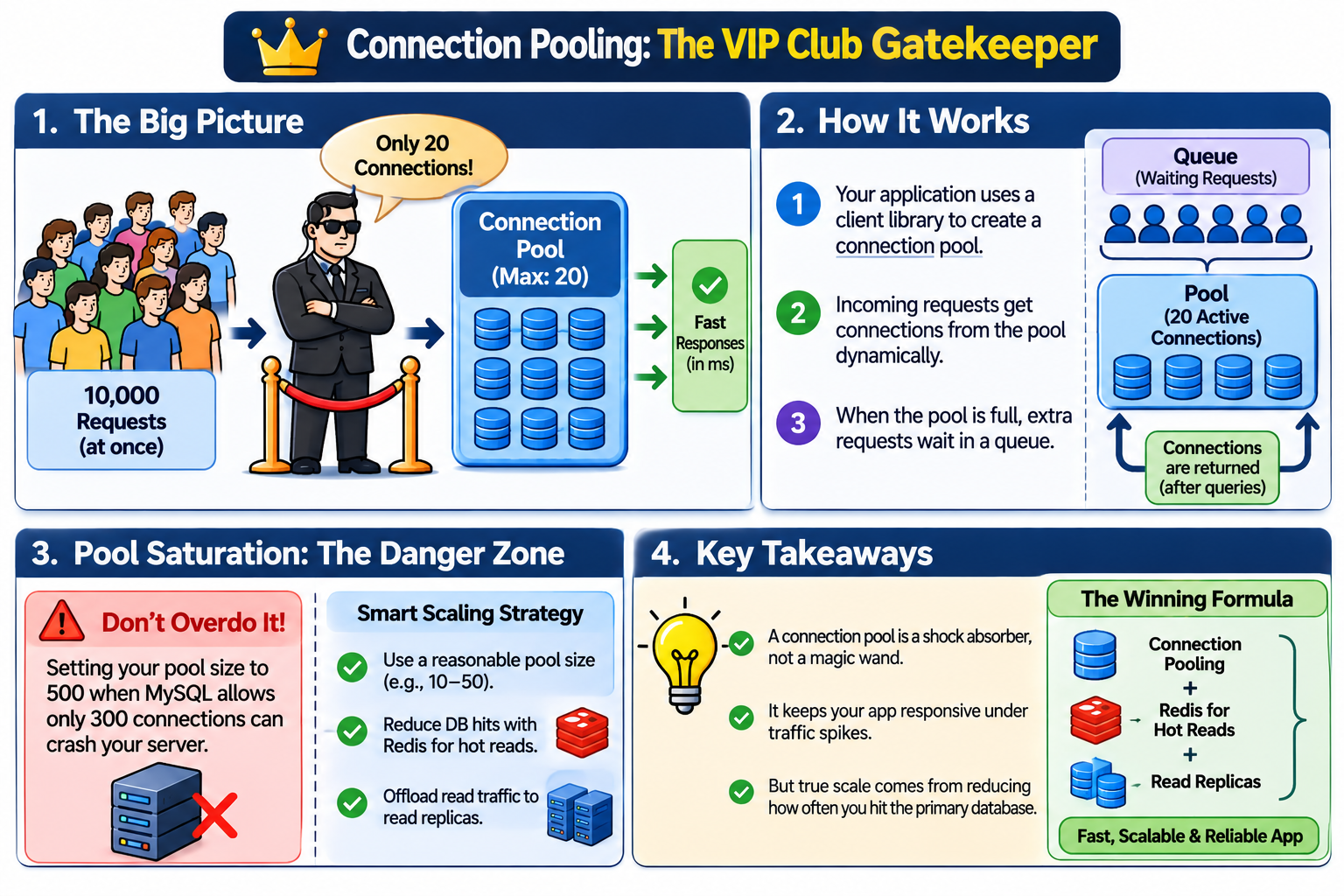
Opening a new database connection is expensive. A Connection Pool acts like a nightclub bouncer with a strict capacity limit (say, 20 active connections). When 10,000 requests hit at once, they queue up cleanly while those 20 connections cycle through fast queries in milliseconds.
Connection pooling is handled by your application using a client library to set up a pool of active connections, which are then assigned dynamically as incoming requests arrive. If the pool is maxed out—for instance, if you set your application's pool limit close to MySQL's max_connections ceiling—any incoming request beyond that limit has to wait in a queue until a connection frees up.
However, a connection pool is a shock absorber, not a magic wand. Simply cranking your pool size up to 500 when MySQL only allows 300 connections will crash your server.
True scale comes from reducing how often requests hit the primary database: putting Redis (covered in a separate article) in front for hot reads, and offloading read traffic to read replicas.
5. Bloom Filters: Saving Disk Trips with Bits in RAM
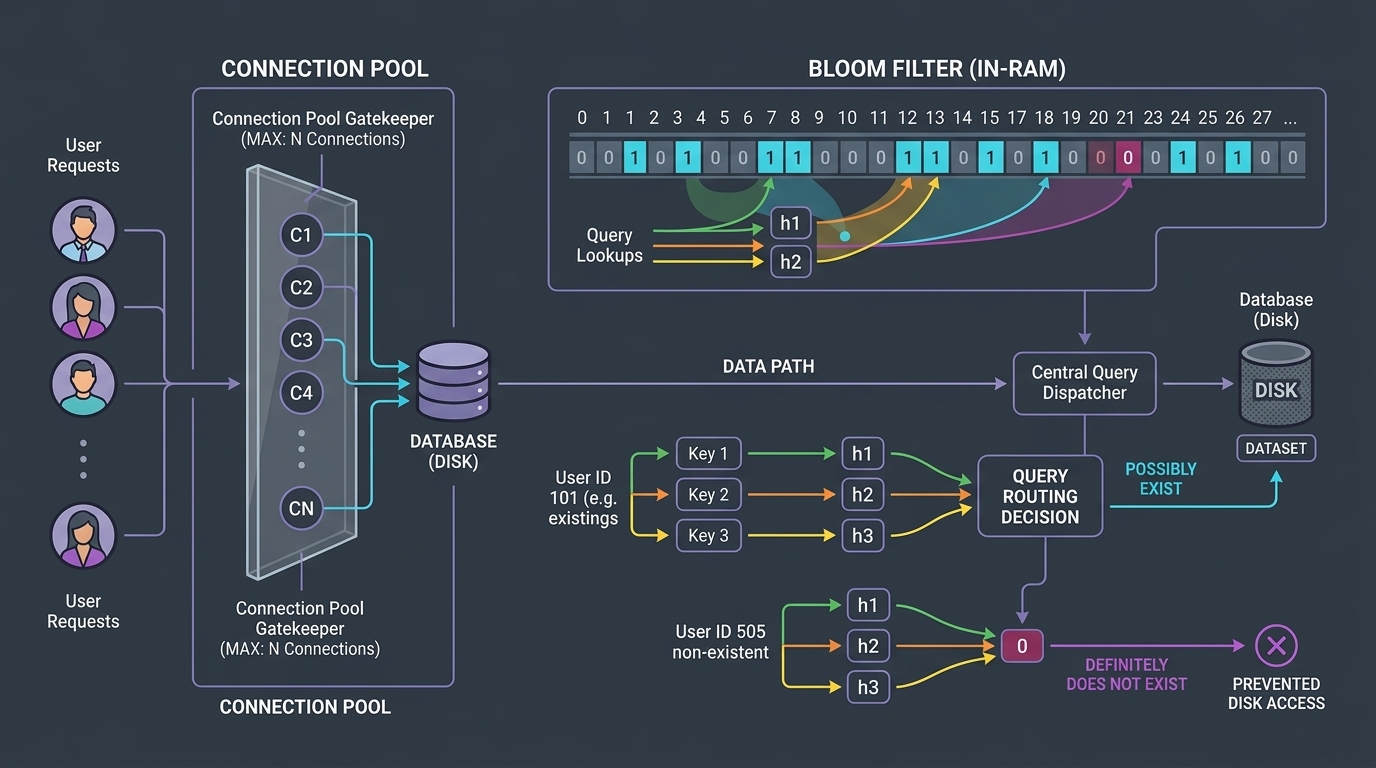
Before checking a massive disk table to see if a username is already taken, you can check a Bloom Filter in RAM. Picture a wall of millions of tiny light switches, all starting at 0. When a user signs up, their username is passed through a few hash functions, flipping specific switches to 1.
If you check a new username and any of its switches is 0, that username definitely does not exist—you never touch the database.

If all switches are 1, the username might exist (or other names happened to flip those same switches), so you verify against the database.
Tracking a million strings takes roughly 1.2 MB of RAM compared to 50–100 MB for a standard B-Tree index. Even with occasional false positives, a nanosecond check in RAM saves millions of slow disk reads.
6. Locks, Isolation Levels, and MVCC
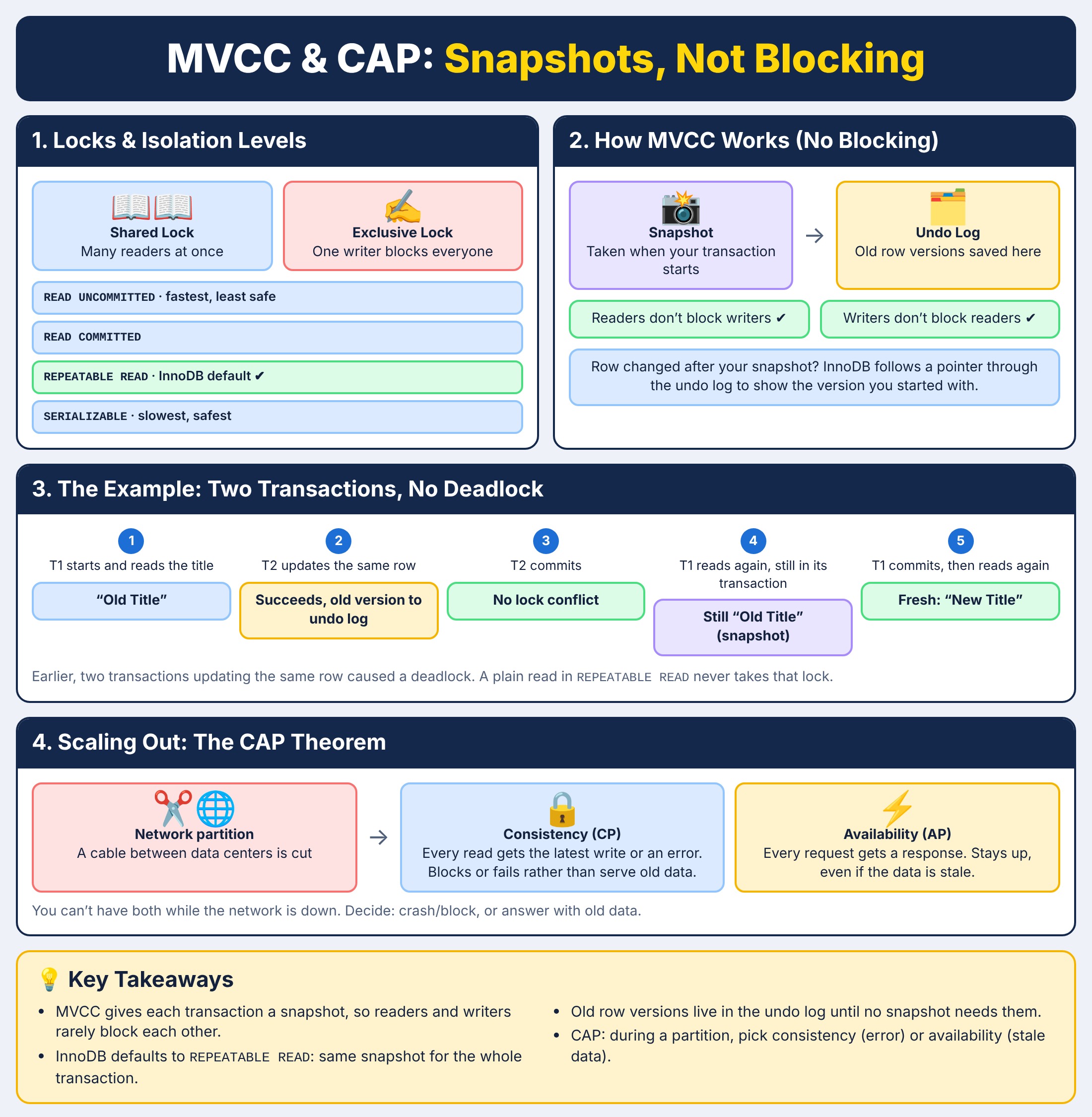
Databases balance speed and data accuracy using Shared Locks (multiple readers can read simultaneously) and Exclusive Locks (one writer blocks everyone else), alongside four isolation levels (READ UNCOMMITTED, READ COMMITTED, REPEATABLE READ, and SERIALIZABLE).
MySQL's InnoDB engine defaults to REPEATABLE READ, yet readers don't block writers and writers don't block readers. It pulls this off using Multi-Version Concurrency Control (MVCC). Instead of locking rows during updates, InnoDB saves older versions of rows in an Undo Log. When you start a transaction, you get a point-in-time snapshot; if another user modifies a row while you're reading, InnoDB simply follows a pointer back through the undo log to show you the version that existed when your snapshot began.
Let's see it in example:
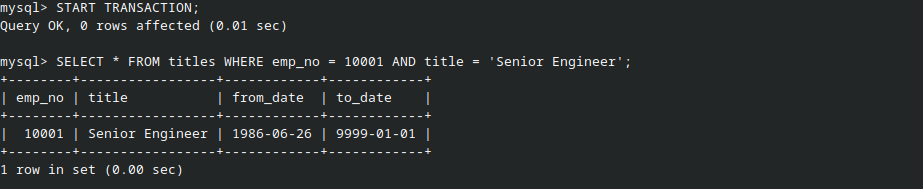
Now let's go to the second transaction which will update this row:

It succeeded while previously on update we got deadlocks since both transactions were updating.
Now let's try reading the data again after committing the first transaction which read the title initially:
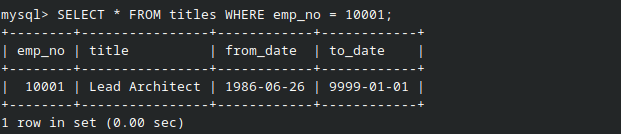
See, now you see fresh data. But what happens when you scale this across multiple servers in different data centers and a network cable gets cut?
That’s where the CAP Theorem comes in. In simple developer terms, when a network partition happens, you have to choose:
- Consistency (CP): Every read receives the most recent write or an error. If servers can't talk to each other to sync up, they'd rather fail or block your request than serve you old data.
- Availability (AP): Every request receives a non-error response—meaning the system stays up and answers you immediately, even if the data it gives you is stale.
You can't have both at the same time when the network drops. You have to decide whether your app prefers to crash/block or lie with old data.
7. Replication Lag: Stale Reads, Not Locks
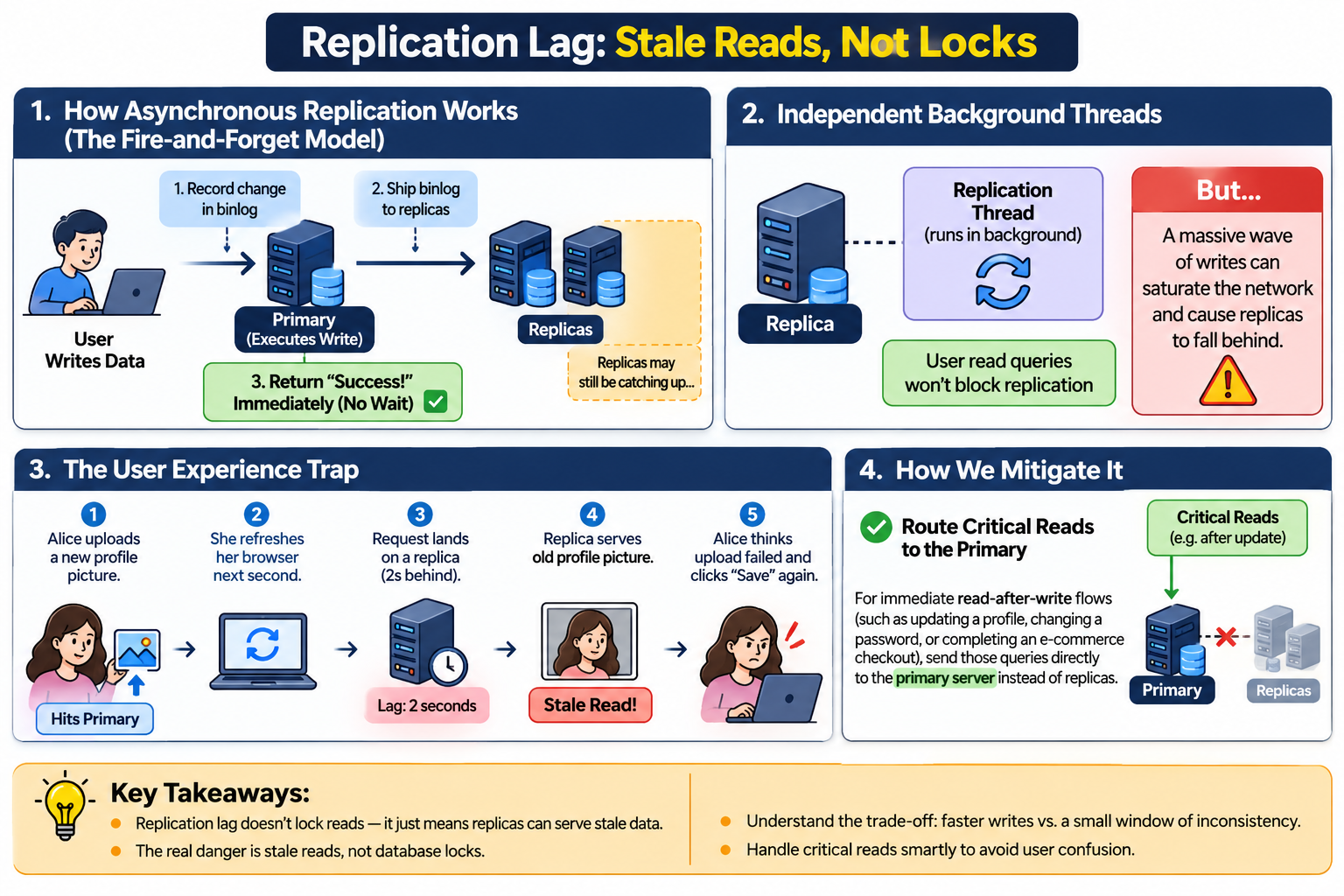
In a Primary-Replique setup, asynchronous replication (where the primary database writes changes locally, fires off the event logs to the replicas, and immediately tells the client "Success!" without waiting for the replicas to finish applying them) means replicas can fall behind during heavy write spikes or network hiccups. Contrary to common belief, replication lag doesn't lock out your read queries—replication threads run independent background loops separate from user connections.
The real danger isn't database locks; it's stale reads. Imagine a user updates their profile on the primary server, immediately refreshes the page, and hits a lagging replica that still serves their old data.
Here is how asynchronous replication and lag actually behave in production:
- How Asynchronous Replication Works (The Fire-and-Forget Model):
- The Primary server executes a write query and records it in its binary log (binlog).
- It ships those binlog events to the replicas over the network.
- Crucially, the primary does not wait for the replicas to confirm they've successfully saved the data before returning a success response to the user. This keeps your writes blazing fast, but it means there is always a tiny window where the replica has stale data.
- Independent Background Threads: Replication runs on its own dedicated threads on the replica. Normal user read queries won't block replication, but a massive wave of writes on the primary can easily saturate the network pipeline and cause replicas to fall behind.
- The User Experience Trap:
- User Alice uploads a new profile picture, which hits the primary server.
- She refreshes her browser the exact next second.
- Her request lands on a read replica that is two seconds behind.
- The replica happily serves up her old profile picture.
- Alice thinks her upload failed and clicks "Save" again, unnecessarily spamming the server.
- How We Mitigate It:
- Route Critical Reads to the Primary: For immediate read-after-write flows (like updating a profile, changing a password, or completing an e-commerce checkout), route those specific queries directly to the primary server instead of the replicas.
Ending
Doing all this made me realize database optimization isn't about memorizing fancy tricks or chasing a mythical 0.001-millisecond query time. For a long time, terms like "MVCC," "sharding," and "replication lag" felt like magic words that senior engineers used just to sound smart.
Turns out, they are just practical solutions to very real bottlenecks:
- I learned the hard way why skipping 100,000 rows with
OFFSETwill eventually melt your CPU.- I watched MySQL gracefully kill my queries with deadlocks when two transactions tried to step on each other's toes.
- I finally wrapped my head around how MVCC and undo logs let readers and writers coexist peacefully without blocking each other.
- And I realized why replication lag means we can't always blindly trust a read replica right after updating our profile.
You don't need to know everything overnight. But once you start looking at execution plans (
EXPLAIN ANALYZE), treating disk reads as expensive, and respecting how databases handle concurrency under the hood, a lot of the mystery goes away.
Comments
Join the discussionNo comments yet. Be the first to comment.