
Redis
Redis's Five Fundamental Data Types: A Deep Dive
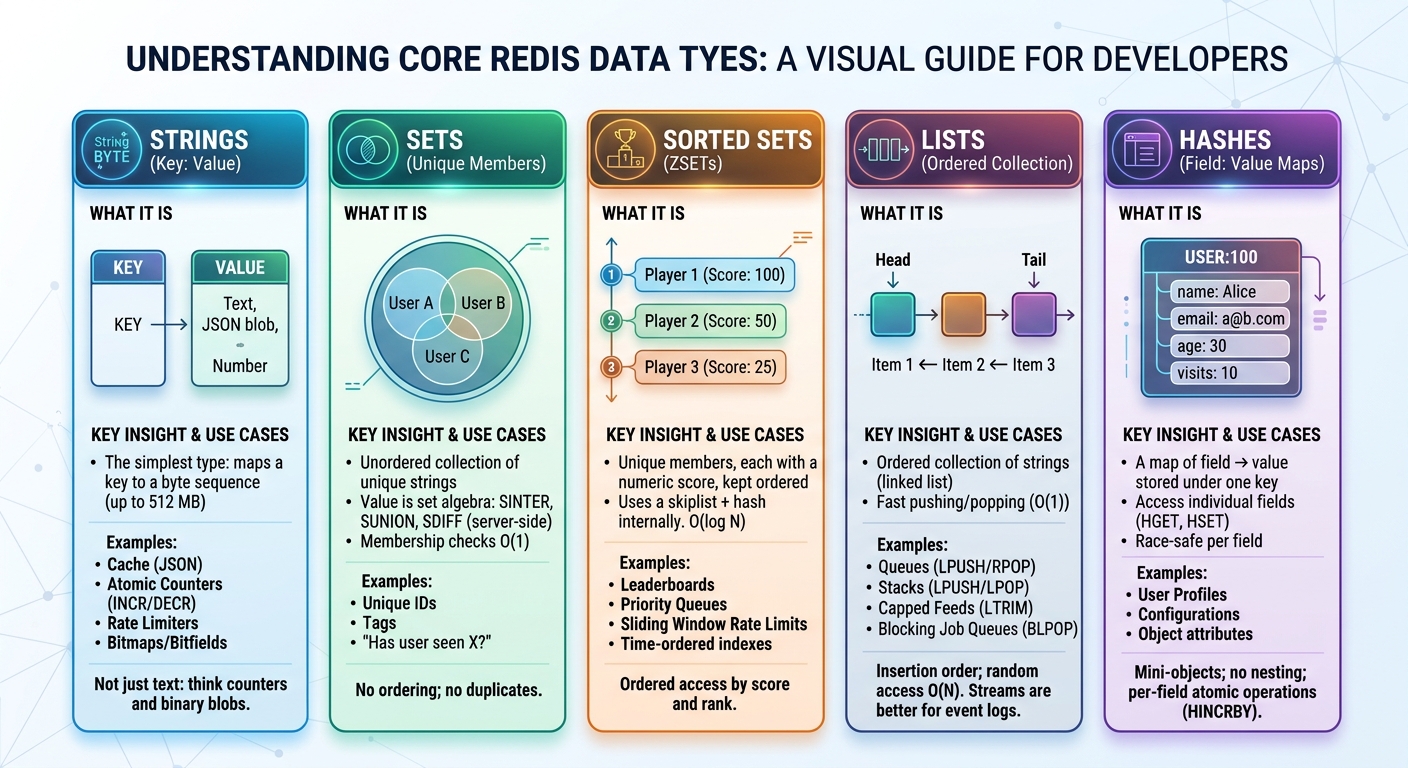
Most people call Redis a key-value store, and honestly that undersells it. A normal key-value store gives you a key, a blob, and GET/SET. That’s it. Redis is more like a data-structure server. Every value has a type, and the type decides what the server can do for you, like atomic increments, set operations, ranking, or blocking pops. So picking a type isn’t about taste. You’re really asking “what operations do I need, and how fast do they have to be?”
In this article we’ll go through the five core data types, then persistence, config, replication, Sentinel, Cluster, and how to debug a misbehaving Redis.
1. Strings
Strings are the simplest type. A key points to some bytes, which can be text, a number, or a serialized JSON blob, up to 512 MB. The part people miss is that INCR and DECR are atomic, so you can build rate limiters, view counters and ID generators without worrying about two clients stepping on each other. If you ever need to cache a serialized object, this is where it goes.
2. Sets
A set is a bunch of unique strings with no order. Adding the same thing twice does nothing, and checking if something exists (SISMEMBER) is fast. The fun part is that Redis can do the set math for you with SINTER, SUNION and SDIFF, so something like “which users saw both campaign A and B” is a single command. The downside is no ordering and no ranges. If you need those, look at sorted sets.
3. Sorted Sets (ZSETs)
Sorted sets are my favorite. Every member has a score, and Redis keeps them ordered by it. You can grab the top 10 (ZRANGE), ask “what rank is this player?” (ZRANK), or pull everything between two scores (ZRANGEBYSCORE), and all of it stays fast. Leaderboards are the obvious use case, but priority queues and sliding-window rate limits work well too. Members are unique, so if you need the same item twice with different values, this isn’t the type for you.
4. Lists
Lists keep items in insertion order, and pushing or popping at either end is fast. That’s why LPUSH with RPOP gives you a simple queue, and LPUSH with LTRIM gives you a capped feed of the latest N items. BLPOP and BRPOP let a worker sit and wait until a job shows up. Reaching into the middle of a big list is slow, though, so don’t use it like an array. For real event streams with consumer groups, use Streams (added in Redis 5) instead of a list.
5. Hashes
A hash is a small object under one key, made of field and value pairs. Say you store a user as a JSON string. Every small change means reading the whole thing, editing it, and writing it back. With a hash you just HSET the one field you care about. HINCRBY works as a per-field counter too. The limits are that values are plain strings, so there’s no nesting, and you can’t search by field value. If your data is deeply nested, a document database fits better.
Key Benefits that Redis Provides
So why use Redis at all? Mainly speed. Everything lives in RAM, so responses come back in under a millisecond. Command execution is single-threaded (newer versions use extra threads for network I/O), which means no lock fights between commands.
It also handles growth and failure. You can shard data across nodes with Cluster, keep copies with replication, and let Sentinel promote a replica if the primary dies. And because it’s so fast, it’s a natural cache. When memory fills up it evicts old keys using policies like LRU or LFU.
On top of that, the data structures give you features for free: sorted sets for rankings, HyperLogLog to count unique visitors with tiny memory, and Streams for event pipelines. It’s also easy to pick up. One config file, simple commands, and a client library for almost every language.
Data Persistence
Lets move forward. If you were paying attention upto this point the first question coming to your mind would be if its stored in memory. Then that means data would be lost on restart. And yes my brother you are correct , partially that is since redis also saves data on disk:
- RDB (Redis Database Snapshots): Redis takes point-in-time snapshots of your entire dataset at configured intervals (can be configured by you) and saves them to disk (.rdb). It is compact and fast for backups and restarts, with one trade-off: if Redis crashes between snapshots, you lose the writes made since the last save.
- AOF (Append-Only File): Every single write command is logged to an append-only file in real time. If the server crashes, Redis replays the log to reconstruct the exact state right up to the failure. You trade a slightly larger disk footprint and minimal write overhead for maximum durability.
- RDB + AOF Hybrid (Production Standard): In production, you rarely have to choose. Running both gives you fast cold starts from RDB snapshots while using AOF to replay only the most recent tail of writes—balancing raw performance with near-zero data loss.
Configuration
We will look now on some configurable values we can set in our configuration file. Based on your installation you will have configuration file either in /etc/redis/redis.conf or /etc/redis.conf.
CLI commands take effect immediately but are not persisted; config file settings survive restarts
We can bind redis to listen on a specific interface ( Bind it to private on production for Security)

Protected mode (
protected-mode yes) acts as a safety net that automatically enforces loopback-only access (127.0.0.1,::1, and Unix domain sockets) if both of the following conditions are true: [1, 2]No explicit bind address is set. The
binddirective inredis.confis not explicitly restricting network interfaces.No password is configured. Neither a legacy
requirepasspassword nor an ACL password for thedefaultuser is set.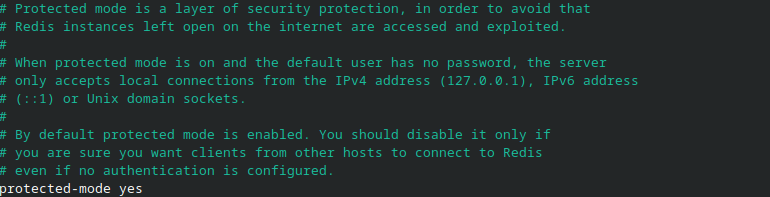
We can specify which port the redis will listen on crucial if multiple redis instances running on same server (Highly unlikely but is possible if resource constraint)

This feature is essentially used by redis to maintain max open tcp connections in case of sudden spikes you can increase it but it will also require some kernel tuning to accept more connection since the redis uses the accept() system call for accepting connections.

timeout and tcp-keepalive:timeout 0means Redis never closes idle connections, andtcp-keepalive 300makes it check dead connections every 5 minutes. If your app uses persistent connection pools (sessions, dashboards, auth APIs), this default is fine and I’d leave it. Only set a timeout if your clients open and abandon connections a lot.unixsocket: disabled by default. Enable it only if your app runs on the same machine as Redis, since it skips the TCP stack entirely.


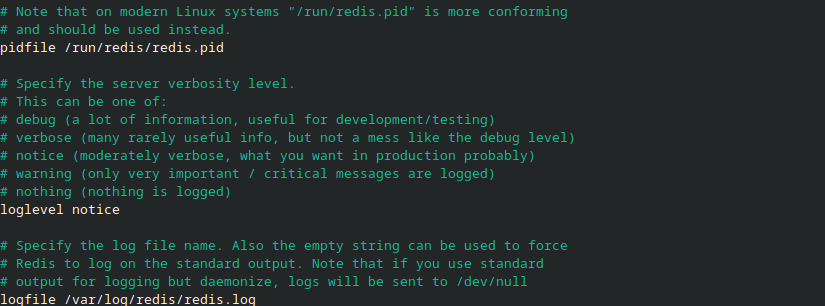
Location of pid file ,
loglevel noticesets the verbosity of Redis server logs tonotice, which is the **default and recommended setting for production and location of redis log file.**Redis runs one command at a time, so each command on its own is atomic. But a sequence of commands isn’t. Your app sends GET, waits for the reply, thinks about it, then sends DECR. In between those two calls, Redis happily serves other clients. That gap is where the race lives. Both users read “1”, both decide they can buy, both decrement, and stock ends up at -1.The fix is to move the decision into Redis. A Lua script runs as one block, so nothing else can sneak in between the check and the update.
databasesSets the number of isolated logical keyspaces.set-proc-titleDynamically updates the Redis process name in OS tools likepsandtopto display runtime details such as its bound IP address, port, and cluster role.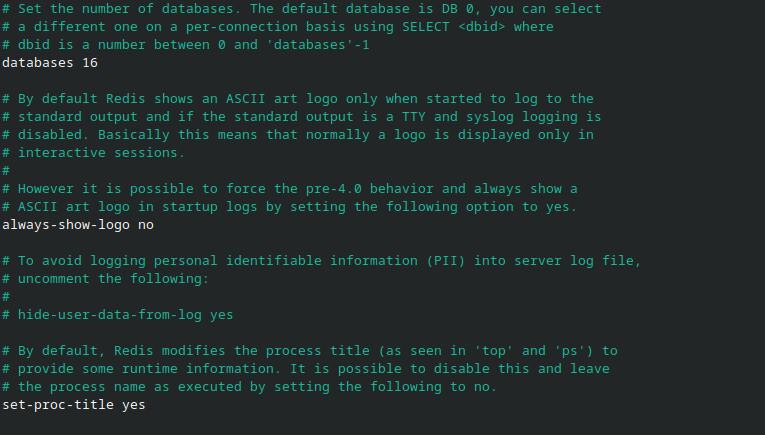
lets keep the configuration file dissection upto here the following configurations focus on sharding and replication and clustering and read only mode.
The Race Condition Problem: Why Lua Scripts Exist in Redis
Before we dive into replication, sharding, and clustering mechanisms, let's first address a common problem we face with this in-memory data store.
As you've heard, Redis is single-threaded and in-memory. Technically, the way it works is that it performs each request — whether it's a SET or a GET — one at a time. Only now consider you're using a shopping cart inside an e-commerce store, and we have one item left in stock. You add it to your cart. So yes, you took the last one.
But if it's a hot item and another person adds the same item to his cart at the same moment, now the same item is booked twice while the quantity of that item remains 1. This problem results in a race condition, which is solved using Lua scripts in Redis — they allow you to perform multiple Redis commands as a single unit, hence providing atomicity.
Let's Walk Through What Actually Happens
Redis runs one command at a time, so each command on its own is atomic. But a sequence of commands isn’t. Your app sends GET, waits for the reply, thinks about it, then sends DECR. In between those two calls, Redis happily serves other clients. That gap is where the race lives. Both users read “1”, both decide they can buy, both decrement, and stock ends up at -1.
The fix is to move the decision into Redis. A Lua script runs as one block, so nothing else can sneak in between the check and the update.
Both users see "1", both pass the check, both decrement. Stock ends at -1. One physical item, two confirmed purchases.
The Lua Fix: Make the Whole Check-and-Act One Unit
The insight is simple: move the decision into Redis, so there is no gap between the check and the act. A Lua script runs as one indivisible unit — no other client's command can interleave while it executes.
-- KEYS[1] = stock key,  ARGV[1] = quantity to buy
local stock = tonumber(redis.call('GET', KEYS[1]))
if stock and stock >= tonumber(ARGV[1]) then
    redis.call('DECRBY', KEYS[1], ARGV[1])
    return 1          -- success
else
    return 0          -- sold out
end
User 2's script cannot start until User 1's script finishes (single threaded remember). There is no window between the read and the write. The check and the act are one step.
Redis Replication
The Core Distinction: Async by Default
Redis replication is asynchronous by default. When you send SET k v, the primary applies it locally, appends it to the replication stream, and replies OK immediately — before the replica has applied anything. The primary does not wait for replica acknowledgment.
Your latency is bounded by the primary's local processing only. No network round-trip to replicas, no waiting on slow replicas, no coordination. This is why Redis does 100k+ writes/sec per node.
If the primary dies right after replying OK but before the replica got the write, that write is gone. On failover, the replica is promoted — and it never had the write. This is replication lag manifesting as data loss.
The replica's offset trails (how much behind the replica) the primary's. Check INFO replication — master_repl_offset versus slave_repl_offset, and master_last_io_seconds_ago. Lag is a read-staleness risk and a failover-duration risk.
WAIT: Synchronous-Like, But Not Synchronous
SET k v
WAIT 2 1000    # block up to 1000ms until 2 replicas ack
Redis replication is asynchronous by default. When you run SET, the primary applies it, replies OK, and sends the change to replicas afterwards. It doesn’t wait for them. That’s why writes are so fast. The catch is that if the primary dies right after replying OK and before a replica got the write, that write is gone. This is replication lag turning into data loss.
If a write really matters, you can use WAIT. It blocks your client until N replicas acknowledge, or until the timeout hits. Always check the return value, since it can return fewer replicas than you asked for. And use it only on important writes, not every SET.
What it does NOT do:
- Doesn't guarantee primary-side durability — if the primary restarts from an old RDB snapshot, the write is lost even if replicas had it.
- Doesn't cover other clients' writes — it's per-connection state, not a global barrier.
- Can return short —
WAIT 2 1000can return1after a second. - Adds latency — at minimum one round-trip to the slowest acking replica.
Use it selectively on critical writes, not every SET.
We can also configure the redis to stream the write directly over the network to replicas even before writing but that assumes no network partition occurs and in that case the data will be lost.
How Replication Works: Full Sync and Streaming
On first connect (or after falling too far behind), the replica does a full sync — the primary forks, writes an RDB snapshot, sends it, and buffers writes to replay after. This is expensive.
After the snapshot, every write is streamed continuously. If a replica drops out, Redis tries a partial resync using the replication backlog (repl-backlog-size, default 1 MB). Do note the following important concept
- If the replica's offset is still inside the backlog, it gets only the missing bytes. If it fell out, it needs a full resync. Size the backlog for your longest tolerable disconnect multiplied by write rate — too small means frequent full resyncs, too large means memory cost. So keep its size large enough to handle temporary network outages and network latency drop.
replicaof <primaryip> <primary port>
This is the persistent form. redis-cli REPLICAOF host port works at runtime but is forgotten on restart. Never use both — the CLI overrides at runtime, then a restart reverts to config, producing a topology that changes under you.
replica-read-only yes
This is read-only mode for replicas — on by default. Replicas reject writes. Why it matters: a write on a replica is not propagated back to the primary, so the replica silently diverges. When failover promotes it, it carries data the primary never had — corruption. Keep this on. Before setting up read scaling, run CONFIG GET replica-read-only and confirm it returns yes.
Note: this is not the same as "replica serves reads." It only means writes are refused. Whether your app reads from replicas is a client-side routing decision.
repl-diskless-sync yesrepl-diskless-sync-delay 5
Normally the primary forks, writes the RDB snapshot to disk, then ships the file. Diskless streams the RDB directly over the socket — no disk write.
The delay setting only matters with diskless on: after a sync request, the primary waits up to N seconds so other replicas arriving in that window can join the same snapshot transfer — one fork, many replicas.
repl-timeout 60
How long the replica waits for communication from the primary before dropping the link and retrying. Too short means spurious disconnects on busy networks (each may trigger a resync — expensive). Too long means slow failure detection and delayed failover. Raise it for high-latency links.
min-replicas-to-write 1min-replicas-max-lag 10\
Master auth is required for replica successfully connecting with master
masterauth your-strong-password\ \
requirepass is for clients connecting to this node.
masterauth is what this replica uses to authenticate to the primary. A replica with requirepass but no masterauth will fail to sync against a password-protected primary — a common misconfiguration.
Redis Sentinel and Clustering Explained
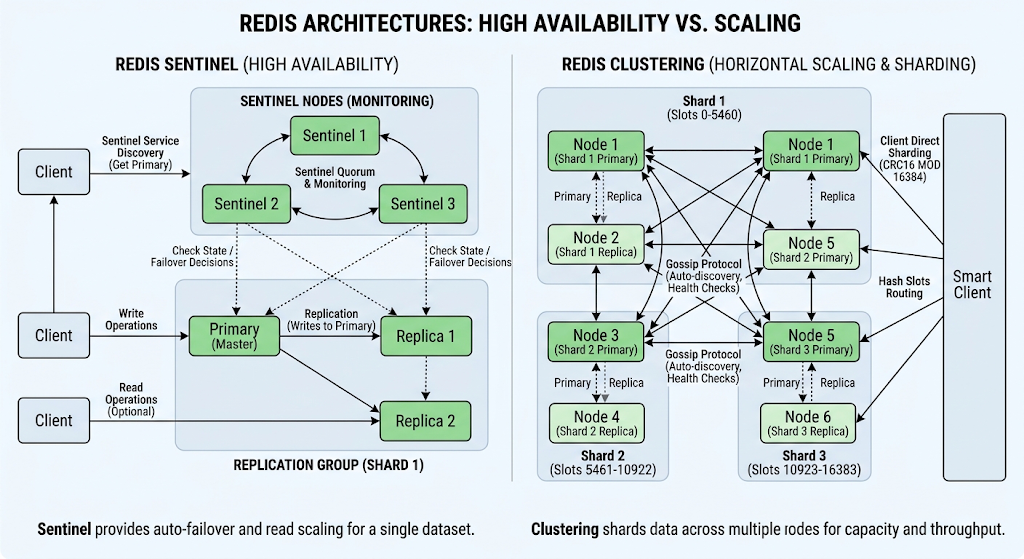
Way 1: Standard Replication + Sentinel
Use this when you want read scaling and automatic failover but your data still fits on one machine. Replication alone can’t fail over. You’d have to run REPLICAOF NO ONE yourself. Sentinel watches the primary, and when it goes down it picks a replica, promotes it, and reconfigures the old primary when it comes back. Run at least three Sentinels so they can agree the primary is really dead, and use a Sentinel-aware client (Lettuce, ioredis, redis-py).
Configuration
replicaof <master-ip> <master-port>   # persistent form; CLI REPLICAOF is not
replica-read-only yes                 # rejects writes on replicas — prevents divergence
repl-diskless-sync yes                # stream RDB over network, no disk (more primary RAM)
repl-diskless-sync-delay 5            # batch multiple replicas into one sync
repl-backlog-size 10mb                # partial-resync window; too small = frequent full resyncs
repl-timeout 60                       # drop dead link after this long
Durability & Safety
min-replicas-to-write 1+min-replicas-max-lag 10: primary refuses writes unless 1 replica is connected and within 10s lag.- Availability trade — healthy primary goes read-only if replicas die.
requirepass: clients auth to this node.masterauth: replica auths to primary. Need both.
Sentinel (automatic failover)
Standard replication alone can't fail over — you'd manually promote with REPLICAOF NO ONE.
Sentinel automates: detect failure → elect replica → promote → reconfigure old primary when it returns.
- Quorum: odd number, at least 3 Sentinels, so they agree the master is dead.
- Client requirement: app must use a Sentinel-aware client (Lettuce, ioredis, redis-py) to ask "who is master now?"
Way 2: Redis Cluster (Horizontal Scaling)
Use this when one machine isn’t enough for writes or memory. Keys are split across 16,384 hash slots using CRC16, and each master owns a range of them. You can talk to any node, and if you hit the wrong one it answers with -MOVED and your client retries on the right one. Failover is built in, so you don’t need Sentinel here.
Core Concepts
- 16,384 hash slots. Key → slot via
CRC16(key) mod 16384. Not consistent hashing. - Multiple masters, each owning a subset of slots (3 masters → ~5,461 slots each).
- Automatic routing: client can hit any node; wrong node returns
-MOVED <slot> <ip:port>and the client re-issues to the correct one. - Built-in failover: masters have replicas; on master death the cluster votes to promote the replica, which inherits the same slots.
- Hash tags
{...}: Redis hashes only the text inside braces.{user100}:nameand{user100}:ageland in the same slot — required for multi-key ops,MULTI, Lua.
# config template per port
port PORT
cluster-enabled yes
cluster-config-file nodes-PORT.conf
cluster-node-timeout 5000
appendonly yes
protected-mode no
dir .

# create 3 masters + 3 replicas
redis-cli --cluster create \
  127.0.0.1:7000 127.0.0.1:7001 127.0.0.1:7002 \
  127.0.0.1:7003 127.0.0.1:7004 127.0.0.1:7005 \
  --cluster-replicas 1

# verify
redis-cli -c -p 7000 cluster info     # cluster_state:ok
redis-cli -c -p 7000 cluster nodes    # roles, IDs, slot ranges
redis-cli -c -p 7000 cluster keyslot user:1001
redis-cli decides the master/replica split for you, then writes that role assignment into each node's metadata file (nodes.conf). There is no pre-existing "master flag" on any of those six servers — they all start as blank Redis instances.
What --cluster-replicas 1 actually means
It says: for every master created, allocate one replica. With six nodes and this flag, the tool computes 6 / (1 + 1) = 3 masters, and the remaining 3 become replicas of those masters .
So the command produces:
- 3 masters (ports 7000, 7001, 7002 in the default layout)
- 3 replicas (ports 7003, 7004, 7005), each following one master
How the tool picks who is master vs replica
The tool does not just take the first three as masters and the last three as replicas blindly. It runs an anti-affinity optimization first: it tries to avoid placing a master and its replica on the same physical host (based on the IP addresses you give). If you pass six
127.0.0.1addresses, that constraint is satisfied because they're all "the same host," so the assignment becomes effectively positional — first half masters, second half replicas.If you passed three different IPs with two ports each, the tool would try to ensure each master's replica sits on a different IP than the master, so a single machine failure doesn't take out both a master and its backup .
Redis Diagnostics & Monitoring
Redis gives you four tools for debugging, and each one answers a different question. INFO tells you if something is wrong. MONITOR shows what commands are flowing. SLOWLOG shows which ones are slow. CLIENT LIST tells you who is sending them. Used in that order, they narrow the problem down.
| Tool | Question | Granularity |
|---|---|---|
| INFO | "What's the overall state? Is something off?" | Server-wide snapshot |
| MONITOR | "What commands are flowing right now?" | Every command, real time |
| SLOWLOG | "Which commands took too long?" | Filtered by execution time |
| CLIENT LIST | "Who is sending these commands?" | Per-connection |
1. INFO — Server-Wide Snapshot
Built-in command returning a categorized dump of server stats and operational state.
redis-cli INFO              # all sections
redis-cli INFO memory       # one section — cuts noise
redis-cli INFO replication  # replication status
Sections: Server (version, uptime), Clients (connected, blocked), Memory (used_memory, maxmemory, fragmentation), Persistence (RDB/AOF status), Stats (hits/misses, commands processed), Replication (role, sync), CPU, Modules, Errorstats (flags misconfigs), Cluster, Keyspace (key count per DB).
Why it matters: detect memory leaks, tune eviction policy, decide when to scale, quick health check.
Key metrics to watch:
used_memoryvsmaxmemory→ headroom / eviction riskmem_fragmentation_ratio→ memory efficiencyconnected_clients→ connection pressurekeyspace_hits/keyspace_misses→ cache effectivenessrejected_connections→ overload signal
2. MONITOR — Live Command Stream
Streams every command the server processes, in real time.
redis-cli MONITOR # Ctrl+C to stop
Each entry: timestamp, client IP + port, command + full arguments.
Use cases: real-time debugging, diagnose unexpected behavior, verify commands reach Redis as expected.
A word of caution on MONITOR: it prints every command, including passwords sent with AUTH, and it slows down a busy server. Use it for short debugging sessions only, never leave it running on a production primary.
3. SLOWLOG — Capture Slow Commands
Records commands exceeding a configurable threshold — for finding bottlenecks.
SLOWLOG GET [count]   # retrieve entries
SLOWLOG LEN           # count
SLOWLOG RESET         # clear log
Each entry: ID, execution time in microseconds, command + args, timestamp, client ID/IP.
Configuration:
| Parameter | Meaning | Example |
|---|---|---|
slowlog-log-slower-than |
Threshold in microseconds | 10000 = 10 ms |
slowlog-max-len |
Ring-buffer size | 128 |
Special values for threshold: 0 = log everything; -1 = disable.
Notes:
- Storage is bounded — oldest entries silently dropped.
- Only commands above threshold are recorded — routine traffic doesn't clutter it.
SLOWLOG RESETclears logged data only; no effect on execution.
4. The Drill-Down Workflow (the real lesson)
Say memory keeps climbing. INFO confirms it (used_memory going up), but not why. MONITOR shows which commands are hitting Redis, but not whether any are slow. SLOWLOG tells you if it’s a slow-command problem or just heavy load. Finally CLIENT LIST shows which client is doing it. By then you know who the culprit is.
Redis looks simple when you start with SET and GET, but there’s a lot going on under the hood. Play around with replication and Cluster in a lab before you touch production, because breaking things on purpose is the best way to learn them.
Comments
Join the discussionNo comments yet. Be the first to comment.